
If you run a shop or a small business, you know the drill: a vendor hands you a purchase bill, and later you sit down and retype the whole thing into your books — item by item, rate by rate, tax by tax. It’s slow, it’s dull, and it’s where a lot of mistakes creep in. The good news is you don’t have to do it anymore. This guide explains why manual purchase-bill entry costs you more than you think, and how to automate it.
Why manual purchase-bill entry is such a drain
Typing a purchase bill isn’t just a few minutes lost. Each bill means:
- Re-keying every line — item names, quantities, rates, discounts and the GST split.
- Creating masters as you go — if an item or the vendor isn’t in your books yet, you stop and add it first.
- Catching your own typos — a wrong quantity or tax figure quietly becomes wrong stock and a GSTR-2B mismatch at return time.
- A backlog — bills pile up, so your stock and purchase figures are always a few days out of date.
Multiply that across every vendor bill in a month and it’s hours of work that adds zero value — the information is already printed on the bill.
The four ways businesses handle purchase bills
Here’s how most Indian businesses deal with purchase-bill entry today, and how the options compare:
| Method | Speed | Accuracy | Effort |
|---|---|---|---|
| Type it into accounting software | Slow | Depends on you | High — every line by hand |
| Maintain it in Excel | Slow | Low (no validation) | High + no GST/stock link |
| Hire a data-entry person / accountant | Medium | Better, but not instant | Ongoing cost + review |
| AI bill scanning | Fast | High (read from the bill) | Low — capture and review |
The first three all share the same flaw: a human still reads the bill and types it. Bill scanning removes that step entirely.
How AI bill scanning works
Modern bill scanning software uses AI to read a bill and turn it into an entry — no typing. It’s three simple steps:
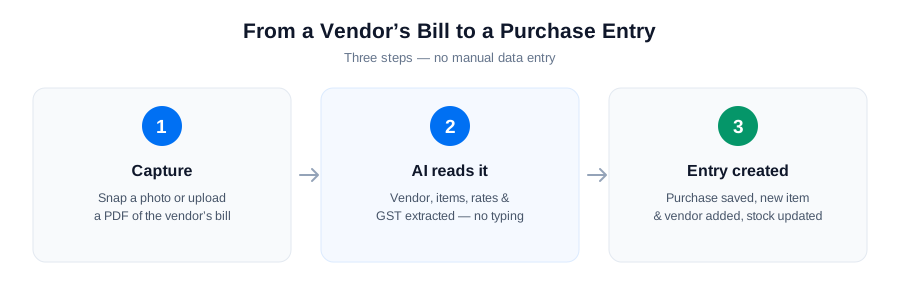
- Capture — snap a photo of the vendor’s bill on your phone, or upload a photo or PDF.
- AI reads it — the vendor, item names, quantities, rates and GST are extracted straight off the bill.
- Entry created — you review, and it’s saved as a purchase — with any new items and the vendor added, and stock updated.
What used to take minutes of typing per bill now takes seconds of reviewing.
What to look for in a bill-scanning tool
Not every scanner is equal. Before you pick one, check that it:
| Capability | Why it matters |
|---|---|
| Reads both photos and PDFs | You can scan a printed bill or forward a digital one |
| Extracts GST details | Captures GSTIN, HSN and the CGST/SGST/IGST split for clean records |
| Auto-creates items & vendors | No stopping to set up masters before you scan |
| Updates stock | The purchase feeds your inventory, so stock stays accurate |
| Lives inside your billing | No separate app to export to and reconcile |
That last point is the big one. Many tools scan a bill and then push it into a separate accounting system, which you still have to check and reconcile. The cleaner approach is bill scanning that’s part of the same software doing your billing, inventory and GST.
Rule of thumb: if you’re still opening a purchase voucher and typing a bill that’s already printed in front of you, there’s a faster way.
Do it in KhataBuddy
KhataBuddy has this built in. Snap a photo or upload a vendor’s bill and its AI reads the vendor, items and amounts and creates the purchase entry for you — adding any new items and the vendor automatically, updating your stock, and capturing GST details. Because it’s the same app that does your billing, inventory and GST, there’s nothing to export or reconcile.
See how it works on the Bill Scanning Software page, or try KhataBuddy free and stop typing purchase bills for good.